Kindly look at Basic-Galaxy-Shooter-1 before proceeding. Code is almost similar. Modify the project code wherever needed to look like the one below

Bullets.h

#include "SFML\Graphics.hpp"
#include "CollisionManager.h"

bool FLAG=false; // flag to know whether collision happened or not, so that source.cpp is informed
const int VELO=20; // velocity of bullet is 20

class Bullets
{
public:
  sf::IntRect box;
  sf::RectangleShape rect; // rectangle shape to display bullet on screen
  int yVel;

  Bullets(int x,int y);
  
  void update();
  void display(sf::RenderWindow *window);

};

Bullets::Bullets(int x, int y)
{
  //initial position of bullet depends on the position of the hero ship
  box.left=x;
  box.top=y;
  box.height=10;
  box.width=2;
  
  rect.setSize(sf::Vector2f(box.width,box.height));
  rect.setFillColor(sf::Color::Blue); // color of bullet
  
  yVel=-VELO; // bullet will move up the screen . so y velocity is negative .
}

void Bullets::update()
{

  box.top+=yVel; // bullet moves up the screen
  if ( CM.CheckCollide(box) == true )
  {
    FLAG=true;
  }
}

void Bullets::display(sf::RenderWindow *window)
{
  //displaying the bullet
  rect.setPosition(box.left,box.top);
  window->draw(rect);
}


HeroShip.h

#include"SFML\Graphics.hpp"
#include"Bullets.h"

//Look at basic galaxy shooter -1 to understand heroship and source.cpp easily
const int VEL=10;
class HeroShip
{
public:
    sf::IntRect box;
    sf::RectangleShape rect;
    int xVel,yVel;
    
    Bullets *myBullets[10]; // 10 bullets can only be fired. can be increased if needed
    int num_of_bullets;

    HeroShip();
    void handleEvents();
    void update();
    void display(sf::RenderWindow *window);
    void shoot();

};

HeroShip::HeroShip()
{
    box.left=200;
    box.top=500;
    box.height=20;
    box.width=20;
    
    rect.setSize(sf::Vector2f(box.width,box.height));
    rect.setFillColor(sf::Color::Red);
    
    xVel=0;
    yVel=0;

    num_of_bullets=0;
}
void HeroShip::handleEvents()
{
    //top or down
    if(sf::Keyboard::isKeyPressed(sf::Keyboard::Up))
        yVel=-VEL;
    else if(sf::Keyboard::isKeyPressed(sf::Keyboard::Down))
        yVel=VEL;
    else
        yVel=0;
    //left or right
    if(sf::Keyboard::isKeyPressed(sf::Keyboard::Left))
        xVel=-VEL;
    else if(sf::Keyboard::isKeyPressed(sf::Keyboard::Right))
        xVel=VEL;
    else
        xVel=0;

    if(sf::Keyboard::isKeyPressed(sf::Keyboard::Z))
        shoot();
    
}

void HeroShip::update()
{
    box.left+=xVel;
    box.top+=yVel;

    for(int i=0;i<num_of_bullets;i++)
        myBullets[i]->update(); // updating every bullet position
}

void HeroShip::display(sf::RenderWindow *window)
{
    for(int i=0;i<num_of_bullets;i++)
        myBullets[i]->display(window); // calling display function of all bullets

    rect.setPosition(box.left,box.top);
    window->draw(rect);
}

void HeroShip::shoot()
{
    //to shoot bullets
    if(num_of_bullets<10)
    {
        myBullets[num_of_bullets]=new Bullets(box.left+box.width/2,box.top-10); // position of bullet : x = middle of hero ship ; y = 10 pixels above the top of enemy ship
        num_of_bullets++;
    }
}


EnemyShips.h

#pragma once
#ifndef ENEMYSHIPS_H
#define ENEMYSHIPS_H

#include"SFML\Graphics.hpp"

class EnemyShip
{
    public:
        sf::IntRect box;
        sf::RectangleShape rect;
        int xVel,yVel;

        EnemyShip();
        void update();
        void display(sf::RenderWindow *window);
        void changeColor();
};

EnemyShip::EnemyShip()
{
    //position of enemy ship on screen
    box.left=300;
    box.top=200;
    box.height=20;
    box.width=20;
    
    rect.setSize(sf::Vector2f(box.width,box.height));
    rect.setFillColor(sf::Color::Yellow);  // enemy ship is colored yellow
    
    xVel=0;
    yVel=0;

}

void EnemyShip::update()
{
    // since enemy ship doesnt move , we do nothing here in update
}

void EnemyShip::changeColor()
{
    rect.setFillColor(sf::Color::Black);  // when enemy ship is hit by a bullet we change its color
}
void EnemyShip::display(sf::RenderWindow *window)
{
    //enemy ship is drawn here
    rect.setPosition(box.left,box.top);
    window->draw(rect);
}

#endif


CollisionManager.h

#include "EnemyShips.h"
//to detect collisions between bullets and enemy ship

class CollisionManager
{

    sf::IntRect *esbox[10]; // enemy ship's position values. can store upto 10 ships' values. but here we use only 1
    sf::IntRect *bulletBox[10]; // to store position of bullets
public:
    int no_of_eships;
    void AssignES(EnemyShip *es); // to fill esbox[] array with enemy ship's positon values
    bool CheckCollide(sf::IntRect box); // to check collision
    
};

CollisionManager CM; // an external object for Collision manager class to use whenever needed from anywhere

void CollisionManager::AssignES(EnemyShip *es)
{
    //Assigning position of enemy ship's to the array esbox
    no_of_eships=0;
    esbox[no_of_eships]=new sf::IntRect;
    esbox[no_of_eships]->left=es->box.left;
    esbox[no_of_eships]->top=es->box.top;
    esbox[no_of_eships]->height=es->box.height;
    esbox[no_of_eships]->width=es->box.width;
    no_of_eships++;
}

bool CollisionManager::CheckCollide(sf::IntRect box)
{
    //checking boundaries of bullet and enemy ship to find whether they collide
    if(box.left > esbox[0]->left 
            && box.left < esbox[0]->left + esbox[0]->width
            && box.top > esbox[0]->top 
            && box.top < esbox[0]->top + esbox[0]->height )
     return true;
    else 
        return false;
}


Source.cpp

//Look at basic galaxy shooter - 1 to understand HeroShip.h and Source.cpp easily


#include <SFML/Graphics.hpp>
#include "HeroShip.h"
#include "EnemyShips.h"


int main()
{
    // Create the main window
    sf::RenderWindow *window;
    window=new sf::RenderWindow(sf::VideoMode(800, 600), "SFML window");
    window->setFramerateLimit(20);

    HeroShip *myship=new HeroShip();
    EnemyShip *es1=new EnemyShip(); // creating an enemy ship
    CM.AssignES(es1); // informing the position of enemy ship to collision manager
    while (window->isOpen())
    {
        // Process events
        sf::Event event;
        while (window->pollEvent(event))
        {
            // Close window : exit
            if (event.type == sf::Event::Closed)
                window->close();
        }
        //user
        myship->handleEvents();
        myship->update();
        //AI
        es1->update();
        //check flag to know whether collision happened. 
        if ( FLAG==true ) //FLAG is from Bullets.h
        {
            es1->changeColor();
            FLAG=false;
        }
        //Display
        window->clear();
        myship->display(window);
        es1->display(window);
        window->display();
    }
    return 0;
}


You can also find this on our Github: Galaxy-Shooter-2
Kindly look at Basic-Galaxy-Shooter-1 before proceeding. Code is almost similar. Modify the project code wherever needed to look like the one below

Bullets.h

#include "SFML\Graphics.hpp"
#include "CollisionManager.h"

bool FLAG=false; // flag to know whether collision happened or not, so that source.cpp is informed
const int VELO=20; // velocity of bullet is 20

class Bullets
{
public:
  sf::IntRect box;
  sf::RectangleShape rect; // rectangle shape to display bullet on screen
  int yVel;

  Bullets(int x,int y);
  
  void update();
  void display(sf::RenderWindow *window);

};

Bullets::Bullets(int x, int y)
{
  //initial position of bullet depends on the position of the hero ship
  box.left=x;
  box.top=y;
  box.height=10;
  box.width=2;
  
  rect.setSize(sf::Vector2f(box.width,box.height));
  rect.setFillColor(sf::Color::Blue); // color of bullet
  
  yVel=-VELO; // bullet will move up the screen . so y velocity is negative .
}

void Bullets::update()
{

  box.top+=yVel; // bullet moves up the screen
  if ( CM.CheckCollide(box) == true )
  {
    FLAG=true;
  }
}

void Bullets::display(sf::RenderWindow *window)
{
  //displaying the bullet
  rect.setPosition(box.left,box.top);
  window->draw(rect);
}


HeroShip.h

#include"SFML\Graphics.hpp"
#include"Bullets.h"

//Look at basic galaxy shooter -1 to understand heroship and source.cpp easily
const int VEL=10;
class HeroShip
{
public:
    sf::IntRect box;
    sf::RectangleShape rect;
    int xVel,yVel;
    
    Bullets *myBullets[10]; // 10 bullets can only be fired. can be increased if needed
    int num_of_bullets;

    HeroShip();
    void handleEvents();
    void update();
    void display(sf::RenderWindow *window);
    void shoot();

};

HeroShip::HeroShip()
{
    box.left=200;
    box.top=500;
    box.height=20;
    box.width=20;
    
    rect.setSize(sf::Vector2f(box.width,box.height));
    rect.setFillColor(sf::Color::Red);
    
    xVel=0;
    yVel=0;

    num_of_bullets=0;
}
void HeroShip::handleEvents()
{
    //top or down
    if(sf::Keyboard::isKeyPressed(sf::Keyboard::Up))
        yVel=-VEL;
    else if(sf::Keyboard::isKeyPressed(sf::Keyboard::Down))
        yVel=VEL;
    else
        yVel=0;
    //left or right
    if(sf::Keyboard::isKeyPressed(sf::Keyboard::Left))
        xVel=-VEL;
    else if(sf::Keyboard::isKeyPressed(sf::Keyboard::Right))
        xVel=VEL;
    else
        xVel=0;

    if(sf::Keyboard::isKeyPressed(sf::Keyboard::Z))
        shoot();
    
}

void HeroShip::update()
{
    box.left+=xVel;
    box.top+=yVel;

    for(int i=0;i<num_of_bullets;i++)
        myBullets[i]->update(); // updating every bullet position
}

void HeroShip::display(sf::RenderWindow *window)
{
    for(int i=0;i<num_of_bullets;i++)
        myBullets[i]->display(window); // calling display function of all bullets

    rect.setPosition(box.left,box.top);
    window->draw(rect);
}

void HeroShip::shoot()
{
    //to shoot bullets
    if(num_of_bullets<10)
    {
        myBullets[num_of_bullets]=new Bullets(box.left+box.width/2,box.top-10); // position of bullet : x = middle of hero ship ; y = 10 pixels above the top of enemy ship
        num_of_bullets++;
    }
}


EnemyShips.h

#pragma once
#ifndef ENEMYSHIPS_H
#define ENEMYSHIPS_H

#include"SFML\Graphics.hpp"

class EnemyShip
{
    public:
        sf::IntRect box;
        sf::RectangleShape rect;
        int xVel,yVel;

        EnemyShip();
        void update();
        void display(sf::RenderWindow *window);
        void changeColor();
};

EnemyShip::EnemyShip()
{
    //position of enemy ship on screen
    box.left=300;
    box.top=200;
    box.height=20;
    box.width=20;
    
    rect.setSize(sf::Vector2f(box.width,box.height));
    rect.setFillColor(sf::Color::Yellow);  // enemy ship is colored yellow
    
    xVel=0;
    yVel=0;

}

void EnemyShip::update()
{
    // since enemy ship doesnt move , we do nothing here in update
}

void EnemyShip::changeColor()
{
    rect.setFillColor(sf::Color::Black);  // when enemy ship is hit by a bullet we change its color
}
void EnemyShip::display(sf::RenderWindow *window)
{
    //enemy ship is drawn here
    rect.setPosition(box.left,box.top);
    window->draw(rect);
}

#endif


CollisionManager.h

#include "EnemyShips.h"
//to detect collisions between bullets and enemy ship

class CollisionManager
{

    sf::IntRect *esbox[10]; // enemy ship's position values. can store upto 10 ships' values. but here we use only 1
    sf::IntRect *bulletBox[10]; // to store position of bullets
public:
    int no_of_eships;
    void AssignES(EnemyShip *es); // to fill esbox[] array with enemy ship's positon values
    bool CheckCollide(sf::IntRect box); // to check collision
    
};

CollisionManager CM; // an external object for Collision manager class to use whenever needed from anywhere

void CollisionManager::AssignES(EnemyShip *es)
{
    //Assigning position of enemy ship's to the array esbox
    no_of_eships=0;
    esbox[no_of_eships]=new sf::IntRect;
    esbox[no_of_eships]->left=es->box.left;
    esbox[no_of_eships]->top=es->box.top;
    esbox[no_of_eships]->height=es->box.height;
    esbox[no_of_eships]->width=es->box.width;
    no_of_eships++;
}

bool CollisionManager::CheckCollide(sf::IntRect box)
{
    //checking boundaries of bullet and enemy ship to find whether they collide
    if(box.left > esbox[0]->left 
            && box.left < esbox[0]->left + esbox[0]->width
            && box.top > esbox[0]->top 
            && box.top < esbox[0]->top + esbox[0]->height )
     return true;
    else 
        return false;
}


Source.cpp

//Look at basic galaxy shooter - 1 to understand HeroShip.h and Source.cpp easily


#include <SFML/Graphics.hpp>
#include "HeroShip.h"
#include "EnemyShips.h"


int main()
{
    // Create the main window
    sf::RenderWindow *window;
    window=new sf::RenderWindow(sf::VideoMode(800, 600), "SFML window");
    window->setFramerateLimit(20);

    HeroShip *myship=new HeroShip();
    EnemyShip *es1=new EnemyShip(); // creating an enemy ship
    CM.AssignES(es1); // informing the position of enemy ship to collision manager
    while (window->isOpen())
    {
        // Process events
        sf::Event event;
        while (window->pollEvent(event))
        {
            // Close window : exit
            if (event.type == sf::Event::Closed)
                window->close();
        }
        //user
        myship->handleEvents();
        myship->update();
        //AI
        es1->update();
        //check flag to know whether collision happened. 
        if ( FLAG==true ) //FLAG is from Bullets.h
        {
            es1->changeColor();
            FLAG=false;
        }
        //Display
        window->clear();
        myship->display(window);
        es1->display(window);
        window->display();
    }
    return 0;
}


You can also find this on our Github: Galaxy-Shooter-2
This is a simple galaxy shooter prototype. As of now, for simplicity we’ll have small rectangle shapes to represent galaxy ship and bullets.

Create a new project or clone the existing pingpong project. If you create a new project, make sure you assign the properties correctly. If you clone, just make a copy of the pingpong project folder and rename it. Then open Visual Studio project and remove the pingpong.h header file.

Create the Bullets.h and HeroShip.h header files as given below.

Make sure your Source.cpp file looks like the once given below.

Comments are given for each statement for better understanding.

At the end , you can move a ship on screen and fire bullets.

Bullets.h

#include"SFML\Graphics.hpp"

const int VELO=20; //velocity of bullet
class Bullets
{
public:
  sf::IntRect box; // to represent bullets dimension
  sf::RectangleShape rect; // to draw bullet as a rectangle
  int yVel; // bullets y velocity

  Bullets(int x,int y); // constructor to specify position of bullet w.r.t ship
	
  void update();  // update fired bullets
  void display(sf::RenderWindow *window); // draw the fired bullets

};

Bullets::Bullets(int x, int y)
{
  box.left=x;
  box.top=y;
  box.height=10; // height of bullet
  box.width=2; // width of bullet
	
  rect.setSize(sf::Vector2f(box.width,box.height)); //set the dim of drawable rect
  rect.setFillColor(sf::Color::Blue); // set blue color for the bullet rect
	
  yVel=-VELO; // bullets move upwards. So negative y velocity
}

void Bullets::update()
{
  box.top+=yVel; // bullets y values are updated; x values remain same
}

void Bullets::display(sf::RenderWindow *window)
{
  rect.setPosition(box.left,box.top); // set the position of rect to draw as bullet
  window->draw(rect); // display bullet
}


HeroShip.h

#include"SFML\Graphics.hpp"
#include"Bullets.h"

const int VEL=10;//Velocity with which ship will move i.e. 10 pixels
class HeroShip
{
public:
  sf::IntRect box; // a box to store the dimensions i.e.x,y,width and height of ship
  sf::RectangleShape rect; //rectangle shape that is displayed
  int xVel,yVel; // variables to store horizontal and vertical velocity
	
  Bullets *myBullets[20]; // array of bullet ptr objects; 20 Bullets to fire 
  int num_of_bullets;  // to keep track of how many bullets have been fired

  HeroShip(); // constructor
  void handleEvents();  // to get input from user
  void update();  // to update values
  void display(sf::RenderWindow *window);  //to display values
  void shoot();  //if user wants to shoot a bullet

};

HeroShip::HeroShip()
{
  box.left=200; // ships initial position is (200,500) on screen
  box.top=500;
  box.height=20; // height and weight of ship is 20x20
  box.width=20;
	
  rect.setSize(sf::Vector2f(box.width,box.height)); //dimension of rect to display
  rect.setFillColor(sf::Color::Red);  // color of the ship
	
  xVel=0; // initially x and y velocity are 0
  yVel=0;

  num_of_bullets=0; // initially bullets fired is 0
}
void HeroShip::handleEvents()
{
  //top or down
  if(sf::Keyboard::isKeyPressed(sf::Keyboard::Up))
    yVel=-VEL;
  else if(sf::Keyboard::isKeyPressed(sf::Keyboard::Down))
    yVel=VEL;
  else
    yVel=0;
  //left or right
  if(sf::Keyboard::isKeyPressed(sf::Keyboard::Left))
    xVel=-VEL;
  else if(sf::Keyboard::isKeyPressed(sf::Keyboard::Right))
    xVel=VEL;
  else
    xVel=0;
  // if Z key is pressed shoot func is called which fires a bullet
  if(sf::Keyboard::isKeyPressed(sf::Keyboard::Z))
    shoot();
	
}

void HeroShip::update()
{
  //update values
  box.left+=xVel;
  box.top+=yVel;
  //update the position of fired bullets
  for(int i=0;i<num_of_bullets;i++)
    myBullets[i]->update();
}

void HeroShip::display(sf::RenderWindow *window)
{
  //display the fired bullets
  for(int i=0;i<num_of_bullets;i++)
	  myBullets[i]->display(window);
	
  //set the x,y values of the rectangle i.e. ship to be displayed
  rect.setPosition(box.left,box.top);
  window->draw(rect); // draw on the window
}

void HeroShip::shoot()
{
  if(num_of_bullets<20)
  {
    // creates a new bullet
    myBullets[num_of_bullets]=new Bullets(box.left+box.width/2,box.top-10);
    num_of_bullets++; // increment the bullet counter
  }
}


Source.cpp

#include <SFML/Graphics.hpp>
#include"HeroShip.h"

int main()
{
    // Create the main window to display 
    sf::RenderWindow *window;
    window=new sf::RenderWindow(sf::VideoMode(800, 600), "SFML window");
    window->setFramerateLimit(20);
    //Create the ship
    HeroShip *myship=new HeroShip();
    //Open the game loop
    while (window->isOpen())
    {
        sf::Event event;
        while (window->pollEvent(event))
        {
            // Close window : exit
            if (event.type == sf::Event::Closed)
                window->close();
        }
 	
       //Get input from user
        myship->handleEvents();
        //Update ships values
        myship->update();
	 
       // Clear screen
        window->clear();
       //display stuff
       myship->display(window);
//finally display the window on screen
       window->display();
    }
    return 0;
}


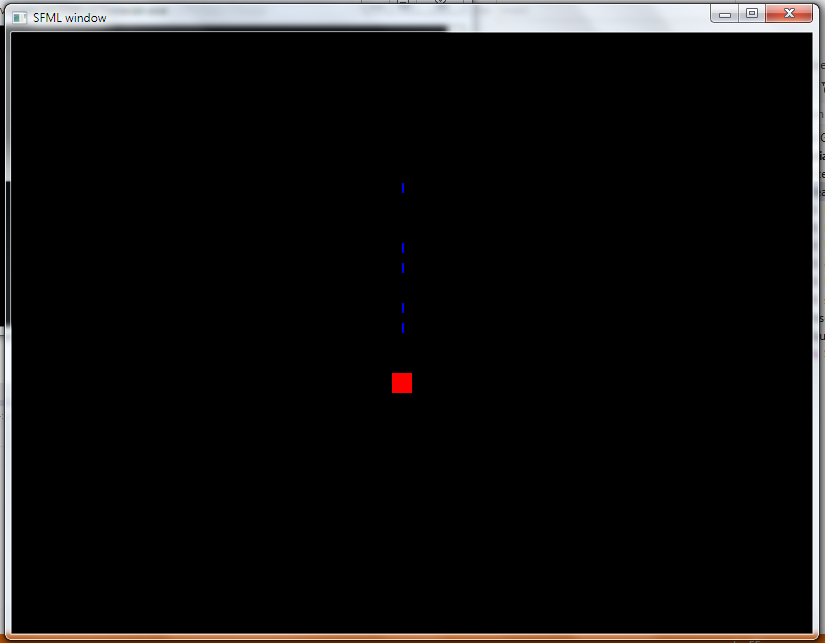
The output is similar to the one below. You can move the red ship using arrow keys and fire using ‘z’ key.


You can also find this on our Github: Galaxy-Shooter

Basically most of the games use images to show stuff. The following tutorial teaches how to load image and show on screen .

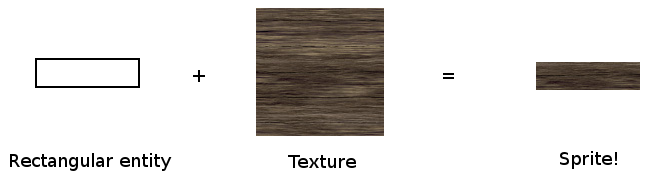
To display an image on screen you need to know the following : Sprites and Textures

Sprites are the drawable things on screen. The are like a imaginary surface over which you paste the textures.

Textures are the image that you wanna show.


Snippet to show image :

sf::Sprite *bgsprite; // a pointer for sprite
sf::Texture bgtex; // bgtex to store the texture

if(!bgtex.loadFromFile("Assets/image.png")) // loads image as texture into bgtex
{
  std::cout<<"\nError loading image";
}
bgsprite=new sf::Sprite();  // creating sprite object
bgsprite->setTexture(bgtex);   // you set the texture to the sprite

// if you wanna clip a particular area from the texture and put into the sprite you can // use the following setTextureRect() function

bgsprite->setTextureRect(sf::IntRect(0,0,800,600));  

window->draw(*bgsprite); //drawing sprite on window


So now its time to create a small tank game. In this tutorial we’ll display background and a tank and make it move in all 4 directions.
1. Create a project.
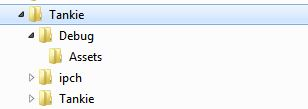
2. Create a folder named as Assets inside the Debug folder . Debug folder is inside your project’s folder.
3. Put the following images inside the Assets folder. The following are sample. Original images are in the link given below.

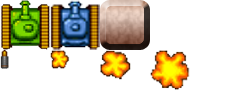
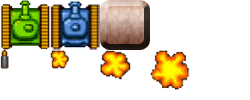
props.png

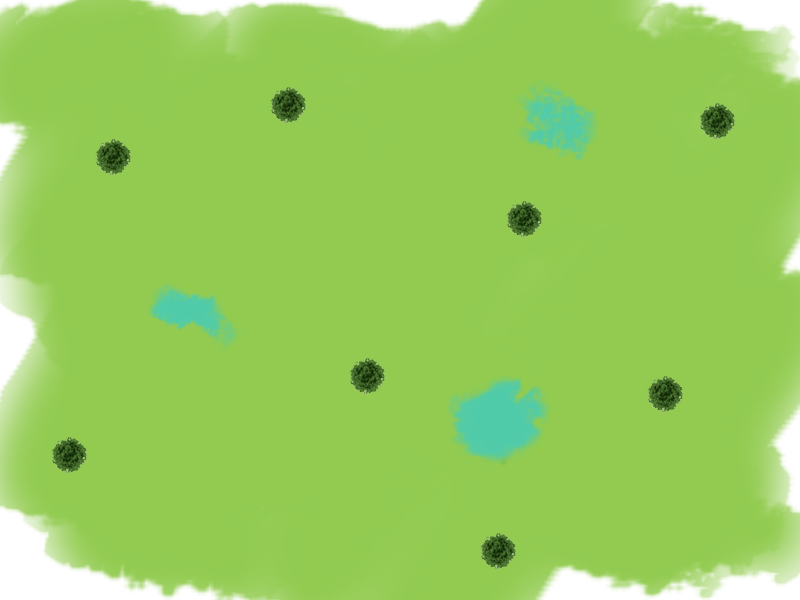
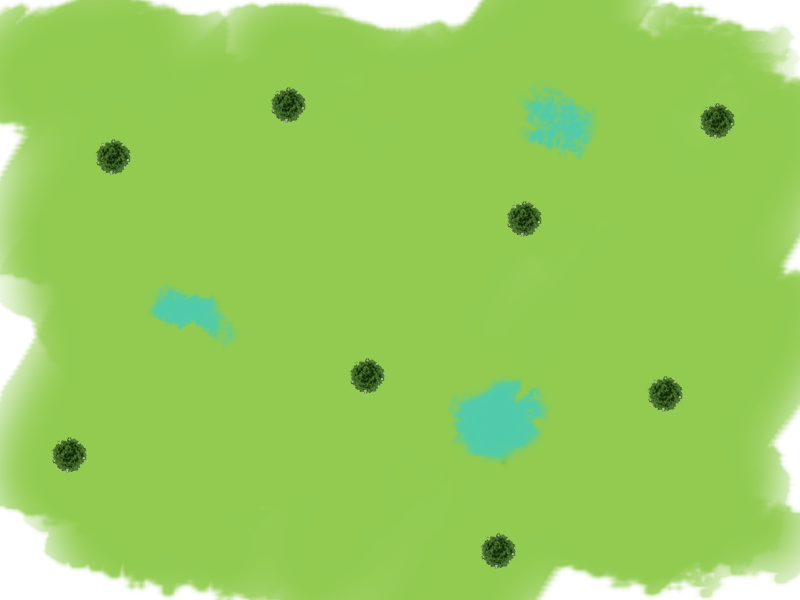
tankmap1.png

Highlighted is the project folder.


The following is the code for moving a tank on a background.

Main.cpp

#include "iostream"
#include <SFML/Graphics.hpp>
#include "Tank.h"

int main()
{

  sf::RenderWindow *window;
  window=new sf::RenderWindow(sf::VideoMode(800, 600), "Tankie!");
  window->setFramerateLimit(20);

  //Sprite for displaying Background Image
  sf::Sprite *bgsprite;
  sf::Texture bgtex;
  if(!bgtex.loadFromFile("Assets/tankmap1.png"))
  {
    std::cout<<"\nError loading background";
  }
  bgsprite=new sf::Sprite();
  bgsprite->setTexture(bgtex);
  bgsprite->setTextureRect(sf::IntRect(0,0,800,600));

  //Creating new hero tank
  Tank *herotank=new Tank(400,500,true);
	
  while (window->isOpen())
  {
    sf::Event event;
    while (window->pollEvent(event))
    {
      if (event.type == sf::Event::Closed)
        window->close();

    }
		
    herotank->handle_input();
    herotank->update();

    //Displaying all on the window
    window->clear();
    window->draw(*bgsprite);
    herotank->display(window);
    window->display();

  }

  return 0;
}


Tank.h

#pragma once
#ifndef TANK_H
#define TANK_H

#include <SFML\Graphics.hpp>

//setting velocity as 10
const int VEL=10;

//to know what direction the tank is moving
const int UP=0;
const int DOWN=1;
const int LEFT=2;
const int RIGHT=3;

class Tank
{
public:

  sf::IntRect Box; // box to keep track of x and y of tank
  int xVel,yVel;  // to track x and y velocity of tank ( can be +ve or ve )

  sf::Sprite *tanksprite; //sprite for displaying tank
  sf::Texture tanktex;  // texture to load tank image

  int rotate;  // to know which direction tank is moving. Can take values UP, DOWN, // LEFT and RIGHT

  Tank(void);
  Tank(int x,int y, bool type);
  ~Tank(void);

  void handle_input();  // to get users input
  void update();   // to update tanks values
  void display(sf::RenderWindow *window);   // to display tank
  void setPosition(int x,int y);
};

#endif


Tank.cpp

#include "Tank.h"
#include "math.h"
#include "iostream"

Tank::Tank(void)
{
}

Tank::Tank(int x,int y, bool type)
{
	
  Box.width=Box.height=50;
	
  //loading the texture of tank from assets folder
  if(!tanktex.loadFromFile("Assets/props.png"))
  {
  std::cout<<"\nError loading tank image";
  }
  //creating sprite		
  tanksprite=new sf::Sprite();
  //loading texture into sprite
  tanksprite->setTexture(tanktex);

  if(type==true)//if type==true then its hero tank
  {
    Box.left=x;
    Box.top=y;
    //clipping only the hero tank from the big spritesheet
    tanksprite->setTextureRect(sf::IntRect(0,0,50,50));
  }
  else // for enemy tank if used
  {
    Box.left=rand()%750;
    Box.top=rand()%300;
  	tanksprite->setTextureRect(sf::IntRect(50,0,50,50));
  }

  yVel=0; //x and y vel are 0 initially since tank is not moving
  xVel=0;
  rotate=UP; // by default the tank points up
}
Tank::~Tank(void)
{
}
void Tank::handle_input()
{
	
  if(sf::Keyboard::isKeyPressed(sf::Keyboard::Up))
  {
    yVel=-VEL;
    rotate=UP; 
  }
  else if(sf::Keyboard::isKeyPressed(sf::Keyboard::Down))
  {
    yVel=+VEL;
    rotate=DOWN;
  }
  if(sf::Keyboard::isKeyPressed(sf::Keyboard::Left))
  {
    xVel=-VEL;
    rotate=LEFT;
  }
  else if(sf::Keyboard::isKeyPressed(sf::Keyboard::Right))
  {
    xVel=+VEL;
    rotate=RIGHT;
  }

}
void Tank::update()
{
  Box.top+=yVel; // updating tanks x and y values
  Box.left+=xVel;
  yVel=0; xVel=0;
}
void Tank::display(sf::RenderWindow *window)
{
  //rotating the sprite according to direction of movement
  if(rotate==UP)
    tanksprite->setRotation(0);
  else if(rotate==DOWN)
    tanksprite->setRotation(180);
  else if(rotate==LEFT)
    tanksprite->setRotation(270);
  else if(rotate==RIGHT)
    tanksprite->setRotation(90);

  tanksprite->setPosition((float)Box.left,(float)Box.top);
  window->draw(*tanksprite); //drawing tank on window

}
void Tank::setPosition(int x,int y)
{
  Box.left=x;
  Box.top=y;
}


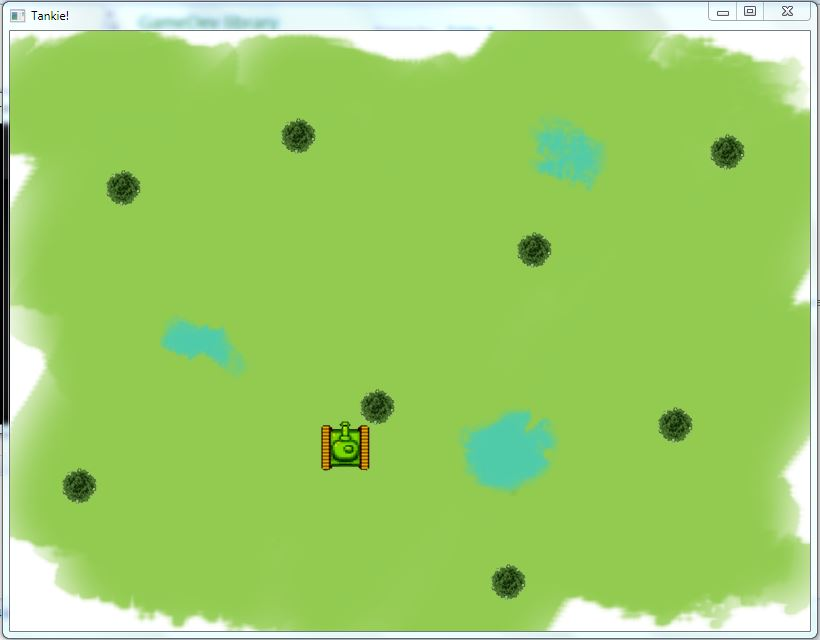
You’ll get an output window similar to the following with tank that can be moved using arrow keys


You can also find this on our Github: Tank-Game

This is the code for Ping Pong game that we did in our second meet.

You can also find this on our Github: Ping-Pong

Main.cpp

#include <iostream>

#include "SFML\Graphics.hpp"
#include "PingPong.h"

int main()
{
    // create the window to show your game 
    sf::RenderWindow *window;

    window=new sf::RenderWindow(sf::VideoMode(600, 600),"My window");
    window->setFramerateLimit(20);
    
    //Initialise the game objects
    init_players();

    // run the program as long as the window is open
    while (window->isOpen())
    {
        // check all the window's events that were triggered since the last iteration of the loop
        sf::Event event;

        while (window->pollEvent(event))
        {
            // "close requested" event: we close the window
            if (event.type == sf::Event::Closed)
                window->close();
        }


        handle_input();

        update();

        perform_ai();

        // clear the window with black color
        window->clear(sf::Color::White);
	    
        // draw everything here...
        display(window);

        // end the current frame
        window->display();
    }

    return 0;
}


Pingpong.h

#include "SFML\Graphics.hpp"

#include <iostream>

//Rectangle for Player Slider
sf::IntRect slider_right;

//Rectangle for AI Slider
sf::IntRect slider_left;

//Rectangle for Ball
sf::IntRect ball;

//Velocity Values for Ball and Slider
const int BALL_VEL   = 10;
const int SLIDER_VEL = 10;

//Velocity variables for Player and Ball
int playerYvel = 0;

int ballYvel = 0;
int ballXvel = 0;

//Rectangle Shape for Player Slider, AI Slider and Ball respectively
sf::RectangleShape R1(sf::Vector2f(20,200));
sf::RectangleShape R2(sf::Vector2f(20,200));
sf::RectangleShape R3(sf::Vector2f(20,20));

//Initialise scores
int SCORE_PLAYER = 0,SCORE_AI = 0;

void init_players()
{
    //Assign values to Ball Rectangle
    ball.left   = 30;
    ball.top    = 30;
    ball.width  = 20;
    ball.height = 20;

    //Assign values to Player Slider Rectangle
    slider_right.left   = 550;
    slider_right.top    = 200;
    slider_right.width  = 20;
    slider_right.height = 200;

    //Assign values to AI Slider Rectangle
    slider_left.left   = 30;
    slider_left.top    = 200;
    slider_left.width  = 20;
    slider_left.height = 200;

    //Fill Colour to the Rectangle Shapes for Player Slider, AI Slider and Ball respectively
    R1.setFillColor(sf::Color::Red);
    R2.setFillColor(sf::Color::Blue);
    R3.setFillColor(sf::Color::Black);

    //Apply velocity to the Ball
    ballXvel = BALL_VEL;
    ballYvel = BALL_VEL;
}

void handle_input()
{
    //If Up arrow is pressed
    if(sf::Keyboard::isKeyPressed(sf::Keyboard::Up))
      playerYvel = -(SLIDER_VEL);

    //If Down arrow is pressed
    else if(sf::Keyboard::isKeyPressed(sf::Keyboard::Down))
      playerYvel = SLIDER_VEL;

    //If no key is pressed
    else
      playerYvel = 0;
}

void update()
{
    //If ball collides with any of the two sliders
    if(ball.intersects(slider_right) || ball.intersects(slider_left) )
      ballXvel = -(ballXvel);

    //If ball collides with the top and bottom walls
    if(ball.top < 0 || (ball.top+ball.height) > 600)
      ballYvel = -(ballYvel);

    //If ball collides with the left side wall
    if(ball.left < 0)
    {
      SCORE_PLAYER +=100;
      ballXvel      = -(ballXvel);
    }

    //If ball collides with the right side wall
    else if((ball.left+ball.width) > 600)
    {
      SCORE_AI += 100;
      ballXvel  = -(ballXvel);
    }
    
    //Change ball's position with respect to velocity
    ball.left += ballXvel;
    ball.top  += ballYvel;

    //Change Player Slider's position with respect to velocity
    slider_right.top += playerYvel;
}

void perform_ai()
{
    //If Ball is above the AI Slider 
    if(ball.top < slider_left.top)
      slider_left.top -= SLIDER_VEL;
  
    //If Ball is below the AI Slider
    else if(ball.top > (slider_left.top + slider_left.height))
      slider_left.top += SLIDER_VEL;
}

void display(sf::RenderWindow *window)
{
    //Displace the Player Slider and draw it on screen
    R1.setPosition(slider_right.left,slider_right.top);
    window->draw(R1);

    //Displace the AI Slider and draw it on screen
    R2.setPosition(slider_left.left,slider_left.top);
    window->draw(R2);
 
    //Displace the Ball and draw it on screen
    R3.setPosition(ball.left,ball.top);
    window->draw(R3);
}