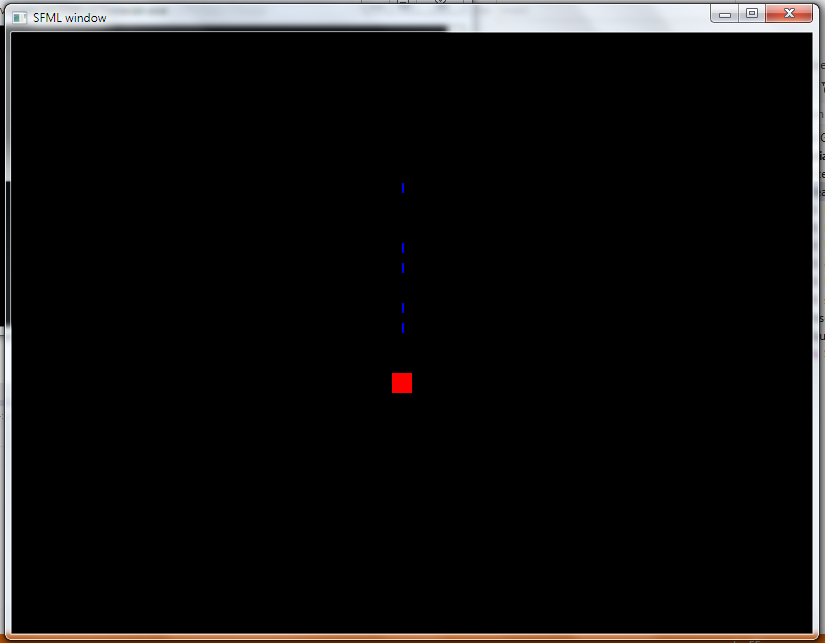
This is a simple galaxy shooter prototype. As of now, for simplicity we’ll have small rectangle shapes to represent galaxy ship and bullets.
Create a new project or clone the existing pingpong project. If you create a new project, make sure you assign the properties correctly. If you clone, just make a copy of the pingpong project folder and rename it. Then open Visual Studio project and remove the pingpong.h header file.
Create the Bullets.h and HeroShip.h header files as given below.
Make sure your Source.cpp file looks like the once given below.
Comments are given for each statement for better understanding.
At the end , you can move a ship on screen and fire bullets.
Bullets.h
#include"SFML\Graphics.hpp"

const int VELO=20; //velocity of bullet
class Bullets
{
public:
  sf::IntRect box; // to represent bullet’s dimension
  sf::RectangleShape rect; // to draw bullet as a rectangle
  int yVel; // bullet’s y velocity

  Bullets(int x,int y); // constructor to specify position of bullet w.r.t ship

  void update();  // update fired bullets
  void display(sf::RenderWindow *window); // draw the fired bullets

};

Bullets::Bullets(int x, int y)
{
  box.left=x;
  box.top=y;
  box.height=10; // height of bullet
  box.width=2; // width of bullet

  rect.setSize(sf::Vector2f(box.width,box.height)); //set the dim of drawable rect
  rect.setFillColor(sf::Color::Blue); // set blue color for the bullet rect

  yVel=-VELO; // bullets move upwards. So negative y velocity
}

void Bullets::update()
{
  box.top+=yVel; // bullet’s y values are updated; x values remain same
}

void Bullets::display(sf::RenderWindow *window)
{
  rect.setPosition(box.left,box.top); // set the position of rect to draw as bullet
  window->draw(rect); // display bullet
}
HeroShip.h
#include"SFML\Graphics.hpp"
#include"Bullets.h"

const int VEL=10;//Velocity with which ship will move i.e. 10 pixels
class HeroShip
{
public:
  sf::IntRect box; // a box to store the dimensions i.e.x,y,width and height of ship
  sf::RectangleShape rect; //rectangle shape that is displayed
  int xVel,yVel; // variables to store horizontal and vertical velocity

  Bullets *myBullets[20]; // array of bullet ptr objects; 20 Bullets to fire
  int num_of_bullets;  // to keep track of how many bullets have been fired

  HeroShip(); // constructor
  void handleEvents();  // to get input from user
  void update();  // to update values
  void display(sf::RenderWindow *window);  //to display values
  void shoot();  //if user wants to shoot a bullet

};

HeroShip::HeroShip()
{
  box.left=200; // ship’s initial position is (200,500) on screen
  box.top=500;
  box.height=20; // height and weight of ship is 20x20
  box.width=20;

  rect.setSize(sf::Vector2f(box.width,box.height)); //dimension of rect to display
  rect.setFillColor(sf::Color::Red);  // color of the ship

  xVel=0; // initially x and y velocity are 0
  yVel=0;

  num_of_bullets=0; // initially bullets fired is 0
}
void HeroShip::handleEvents()
{
  //top or down
  if(sf::Keyboard::isKeyPressed(sf::Keyboard::Up))
    yVel=-VEL;
  else if(sf::Keyboard::isKeyPressed(sf::Keyboard::Down))
    yVel=VEL;
  else
    yVel=0;
  //left or right
  if(sf::Keyboard::isKeyPressed(sf::Keyboard::Left))
    xVel=-VEL;
  else if(sf::Keyboard::isKeyPressed(sf::Keyboard::Right))
    xVel=VEL;
  else
    xVel=0;
  // if Z key is pressed shoot func is called which fires a bullet
  if(sf::Keyboard::isKeyPressed(sf::Keyboard::Z))
    shoot();

}

void HeroShip::update()
{
  //update values
  box.left+=xVel;
  box.top+=yVel;
  //update the position of fired bullets
  for(int i=0;i<num_of_bullets;i++)
    myBullets[i]->update();
}

void HeroShip::display(sf::RenderWindow *window)
{
  //display the fired bullets
  for(int i=0;i<num_of_bullets;i++)
	  myBullets[i]->display(window);

  //set the x,y values of the rectangle i.e. ship to be displayed
  rect.setPosition(box.left,box.top);
  window->draw(rect); // draw on the window
}

void HeroShip::shoot()
{
  if(num_of_bullets<20)
  {
    // creates a new bullet
    myBullets[num_of_bullets]=new Bullets(box.left+box.width/2,box.top-10);
    num_of_bullets++; // increment the bullet counter
  }
}
Source.cpp
#include <SFML/Graphics.hpp>
#include"HeroShip.h"

int main()
{
    // Create the main window to display
    sf::RenderWindow *window;
    window=new sf::RenderWindow(sf::VideoMode(800, 600), "SFML window");
    window->setFramerateLimit(20);
    //Create the ship
    HeroShip *myship=new HeroShip();
    //Open the game loop
    while (window->isOpen())
    {
        sf::Event event;
        while (window->pollEvent(event))
        {
            // Close window : exit
            if (event.type == sf::Event::Closed)
                window->close();
        }

       //Get input from user
        myship->handleEvents();
        //Update ship’s values
        myship->update();

       // Clear screen
        window->clear();
       //display stuff
       myship->display(window);
//finally display the window on screen
       window->display();
    }
    return 0;
}
The output is similar to the one below. You can move the red ship using arrow keys and fire using ‘z’ key.
You can also find this on our Github: Galaxy-Shooter